
Bark - Parental Controls
Bark Technologies, Inc.Parenting
4.02.42K Reviews
- Version
- 6.5.1
- Installs
- 1.00M
- Age Rating
- Everyone
Screenshots



Our Review of Bark - Parental Controls
 Analysis by Appyee
When I think about parental controls, I look for something that helps me notice genuine risks without turning every chat into a reason to worry. Bark - Parental Controls is designed around that balance: it looks for concerning patterns in places children communicate, then gives parents a chance to decide what to do. I like the idea, but the value depends on how a family handles alerts and conversations. It is a support tool, not a substitute for trust or a direct talk with your child.
Free to try, with value tied to your needs
The app is free, which makes it easy to consider without an upfront purchase. That is the clearest cost advantage I can point to; I would not treat “free” as a promise that every service or option a family might want is included at no cost. Before relying on it, I would check the current in-app details and decide whether the available access suits your household.
For a parent who wants help keeping an eye on online safety across social media, texts, and email, the practical value is the possibility of getting a useful prompt instead of having to inspect every conversation manually. That can save time and make difficult topics easier to raise. It is less compelling if you only want a basic device timer, or if your family prefers to manage online rules through built-in phone settings and regular check-ins.
What the alerts can—and cannot—do
Alerts are most helpful when I treat them as a cue to learn more, not as proof that something bad has happened. A phrase that seems alarming in isolation can be a joke, a quote, or part of a conversation whose meaning depends on context. The useful next step is usually a calm question, not an immediate accusation or punishment. That approach protects the relationship while still taking a possible warning seriously.
There is also a real privacy trade-off. Monitoring can reassure a caregiver, but a child may experience it as surveillance if the rules are hidden or never explained. I would tell a child what kinds of risks the family is watching for, why alerts may happen, and how you plan to respond. Bark works best as part of an agreed safety plan rather than a secret test of a child’s behavior.
For families comparing options, built-in parental controls are often a better fit when the goal is simply setting device schedules or limiting access. A manual review of accounts gives a parent more direct context, but it takes time and can become intrusive. Bark’s approach is different: it aims to surface potential concerns across communications so a parent can follow up. That distinction matters more than choosing the app with the longest feature list.
A routine that makes alerts more useful
Imagine a teenager has a stressful week and sends a friend a message that sounds unusually bleak. A notification could give a parent a reason to check in that evening. I would start with an open question about how the week is going, listen before mentioning the alert, and avoid assuming the message tells the whole story. If the conversation points to immediate danger, an app notification is not enough; a parent should seek appropriate real-world help.
A small household routine can prevent alert fatigue. I would decide in advance who receives notifications, when to review them, and which concerns need a same-day conversation. If several adults share responsibility, agreeing on a response beforehand avoids one parent reacting strongly while another has not seen the context. The goal is not to turn every signal into an emergency; it is to make sure important signals are not ignored.
It is also worth revisiting expectations as a child grows. A setup that feels reasonable for a younger child may feel overbearing to an older teen. I would explain what is monitored, invite questions, and discuss when more independence is appropriate. Bark can support that conversation, but it cannot decide where a family’s privacy boundary should sit.
Who is most likely to benefit
I see the strongest fit for parents who want an extra layer of awareness around online communication and are prepared to follow alerts with thoughtful conversations. It may also help caregivers who find it difficult to keep up with several communication channels, provided they understand that monitoring does not reveal every part of a child’s online life. The app is a prompt for parental attention, not a guarantee that every risk will be caught.
It is a weaker fit for a family seeking a completely hands-off solution, a tool that can make parenting decisions automatically, or controls focused only on screen schedules. It may also not suit a child who has not been told about monitoring and would reasonably see it as a breach of trust. If the main concern is a specific device-level restriction, the phone’s own controls may be simpler. If the main concern is emotional well-being, direct support and conversation matter more than any monitoring app.
How I would judge its day-to-day value
Bark is a parenting app from Bark Technologies, Inc., and its focus is narrower and more communication-centered than a general device-management tool. Its store summary points to risks such as cyberbullying, sexting, and depression across social media, text, and email. That focus can be useful when the question is “Is there something I should check in about?” It is not the same as reading every exchange or knowing the full story behind a child’s online behavior.
The app has an average rating of 4.2 from around ten thousand ratings, and it has been installed over five hundred thousand times. Those figures suggest that many families have tried it, but they cannot tell me whether it will match an individual household’s expectations. I would weigh its communication-safety focus and free access more heavily than popularity when deciding whether to use it.
It is rated for everyone, and version 5.6.16 requires Android 6.0 or later. Those details are useful when checking whether the app is suitable for a household device, but they do not settle questions about a child’s comfort with monitoring. The release date is November 23, 2016, so I would still check the current app experience and support for the particular accounts and devices my family uses before building a routine around it.
Getting Started with Bark
Installing the Bark - Parental Controls app is a breeze. Once you download it, the app guides you through the setup process in a way that's straightforward and user-friendly. No tech wizardry required! You’ll link your child’s devices and accounts, and voilà—you’re ready to go.
What really caught my eye was the variety of platforms Bark supports. From social media to text messages and even email, it covers all the bases. Trust me, not many apps can boast this level of comprehensive monitoring. It feels like Bark has thought of everything to give parents peace of mind.
Features That Stand Out
One of the coolest things about Bark is its AI-driven algorithms. It doesn’t just flag keywords; it actually understands context. So, when your kid is chatting away, Bark can differentiate between a harmless joke and something potentially harmful. I found this feature both impressive and reassuring.
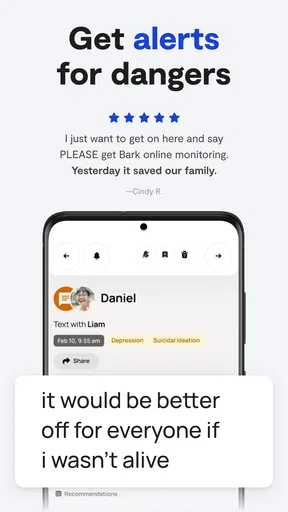
Bark also offers customizable alerts. You decide what you want to be notified about, whether it's cyberbullying, explicit content, or even signs of depression. This level of customization lets me feel more in control. Plus, the app's dashboard is super intuitive—it's like having a command center for your child's digital world.
Real-Life Scenarios
Let me give you an example. Imagine your kid is texting a friend about feeling down. Bark picks up on certain phrases and sends you an alert. You can then decide if you want to have a conversation with your child or seek professional help. It’s like having a sixth sense when it comes to your child’s well-being.
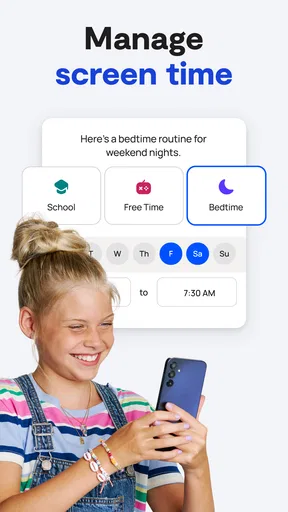
Another neat feature is the screen time management tool. You can set limits on how long your kids can use their devices each day. I tried it out, and it works like a charm. The ability to pause the internet with a single tap is a game-changer for family dinners and bedtime.
Making the most of the controls
I would keep the first setup focused rather than trying to change every rule at once. Start with the concerns that matter most to your family, explain the purpose of the alerts, and give everyone a chance to understand how the routine will work. This makes it easier to tell whether the app is helping or simply adding another source of tension at home.
For screen-time rules, consistency matters more than using the strictest limit. A family might agree on a device pause during dinner and a separate bedtime routine, then review whether those boundaries are working after a few weeks. A one-tap internet pause can be convenient in the moment, but I would explain when it may be used so it does not feel like an unpredictable punishment.
I would also avoid using an alert as a shortcut around a conversation. If a notification concerns a sensitive subject, it can be tempting to jump straight to questioning a child about the exact message. A gentler opening—asking how things are going with friends or school—often gives more room for an honest answer. The alert can guide what I pay attention to without dictating the whole conversation.
Questions worth settling before you rely on it
One practical question is whether the app works with the accounts and devices your child actually uses. Because Bark’s usefulness depends on connecting the relevant communication sources, I would check compatibility during setup rather than assume every service is covered. If a child moves to a new account or device, I would revisit the setup instead of assuming the previous arrangement still gives a complete picture.
Another question is how to respond when an alert seems serious but the child says it was misunderstood. I would take the concern seriously, ask for context, and avoid treating the notification as a verdict. This is especially important with humor, slang, and messages shared among friends, where a short excerpt may not show intent. If the concern remains significant after talking, seek the kind of support appropriate to the situation rather than expecting the app to resolve it.
Parents may also wonder whether Bark replaces direct supervision. In my view, it does not. It can help direct attention, but it cannot judge a child’s mood in person, understand every relationship, or replace guidance about respectful and safe online behavior. The strongest setup combines monitoring with clear family rules and regular conversations.
Final Thoughts
So, is Bark worth it? In my opinion, absolutely. It provides a robust suite of tools that make it easier to keep kids safe online without being intrusive. The app strikes a good balance between monitoring and respecting your child’s privacy. It's a modern-day parenting tool that doesn’t feel like a burden.
If you’re looking for an app to help you navigate the digital world of parenting, give Bark a try. It’s like having an extra pair of eyes watching over your kids online, and who wouldn’t want that?
My recommendation comes with one condition: go in with realistic expectations. The free app is worth considering if you want communication-focused alerts and are ready to use them thoughtfully. If your priority is only device scheduling, built-in controls may be enough; if your priority is trust, start with a family conversation before adding monitoring. For parents who need a nudge to notice a possible online concern, Bark can be a useful extra layer—as long as the human follow-up stays at the center.
Privacy and Permissions
See what permissions an app requests and how it handles your data.
- Location
- approximate location (network-based), precise location (GPS and network-based)
- Other
- view network connections, full network access, run at startup, control vibration, prevent device from sleeping
Verdict
Strengths of Bark - Parental Controls
- User-friendly interface for easy navigation.
- Comprehensive activity reports and alerts.
- Customizable screen time limits.
- Location tracking for child safety.
- App blocking to prevent distractions.
Limitations of Bark - Parental Controls
- Limited features in free version.
- Can be challenging to set up initially.
- Some reports may have delays.
- Requires internet connection for updates.
- Child may try to bypass restrictions.
Similar Picks in This Category
View All
Family Space
Motorola Mobility LLC.3.9

شرطة الأطفال - مكالمة وهمية
Oub Apps4.1

Findmykids: Parental Control
LETEM LTD4.6

Pregnancy + | Tracker App
Philips Electronics UK Limited4.8

Policía de niños - para padres
Kids police4.7

Pregnancy App
Amila4.9
Frequently Asked Questions
What is Bark - Parental Controls, and how does it work?
Bark is a comprehensive parental control app designed to monitor children’s online activities. It uses artificial intelligence to detect potential issues like cyberbullying, inappropriate content, and online predators. The app sends alerts to parents, allowing them to address concerns while respecting their children’s privacy by not providing full access to messages.
What devices and platforms does Bark support?
Bark is compatible with both Android and iOS devices. It also works on computers, supporting Windows and macOS, and can monitor various social media platforms, emails, and text messages. This extensive compatibility ensures that parents can keep an eye on their children's online presence across multiple devices.
Is Bark easy for parents to set up and use?
Yes, Bark is designed with user-friendliness in mind. The setup process involves downloading the app, creating an account, and connecting your child’s devices. The app provides a step-by-step guide to simplify the process, and parents can easily customize their monitoring preferences through an intuitive dashboard.
Does Bark respect children's privacy while monitoring?
Bark prioritizes privacy by only alerting parents to potential issues rather than providing full access to their children’s communications. This approach helps maintain trust between parents and children while ensuring safety. Instead of reading every message, parents receive alerts for flagged content, allowing them to address specific concerns.
What type of alerts and reports does Bark provide?
Bark offers real-time alerts for potential issues like cyberbullying, explicit content, and online predators. Parents receive detailed reports highlighting flagged activities, enabling proactive engagement with their children. The app also provides insights and recommendations on how to address specific issues, making it a comprehensive tool for online safety.
